Best Smartphones for Kids in Bangladesh 2026 - Safe Phones with Parental Controls
Best Smartphones for Kids in Bangladesh 2026 - Safe Phones with Parental Controls
Giving your child their first smartphone is a big decision. You want a phone that is affordable, durable, and safe with good parental controls. This guide covers the best smartphones for kids available in Bangladesh in 2026.
What to Look for in a Kids' Phone
- Affordable price (under 15,000 BDT)
- Durable build (can survive drops)
- Parental control features
- Limited access to apps and internet
- Long battery life
- Good size for small hands
- Basic camera for photos and video calls
Top Phones for Kids in Bangladesh 2026
| Rank | Model | Price (BDT) | Display | Battery | Parental Controls | Best For | Buy Link | 1 | Infinix Smart 10 | 12,499 | 6.6" HD+ 90Hz | 5000 mAh | Google Family Link | Best overall kids phone | Buy | 2 | Samsung Galaxy A06 | 14,499 | 6.5" HD+ | 5000 mAh | Samsung Kids Mode + Family Link | Best with Samsung Kids | Buy |
|---|
Detailed Reviews of Kids' Phones
Infinix Smart 10 - Best Overall Phone for Kids
The Infinix Smart 10 at 12,499 BDT is our top recommendation for kids. The 5000 mAh battery lasts all day. The 90Hz display is smooth for basic games. The phone is durable with a plastic back that won't shatter. Google Family Link allows parents to set screen time limits, approve apps, and track location. The phone is affordable enough that it won't be a disaster if lost or damaged.
Buy Infinix Smart 10 for kids ?
Samsung Galaxy A06 - Best with Samsung Kids Mode
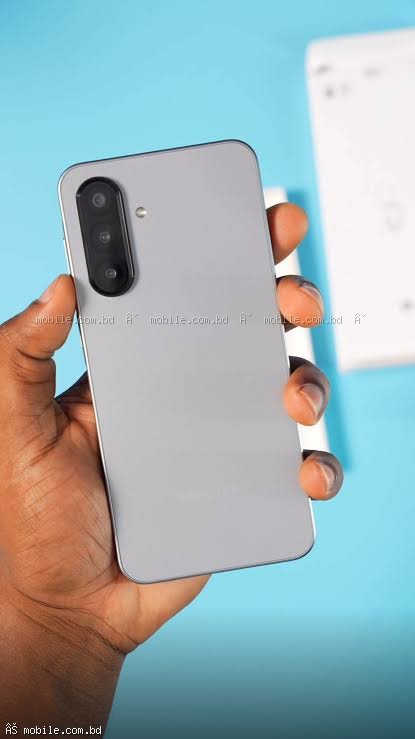
The Galaxy A06 at 14,499 BDT offers Samsung's built-in "Kids Mode" which creates a separate, child-friendly interface. Parents can control which apps are accessible, set time limits, and even allow calls only to approved contacts. Combined with Google Family Link, this is the most comprehensive parental control system. The phone is durable with Gorilla Glass protection.
How to Set Up Parental Controls
Google Family Link (Works on Any Android Phone)
Step 1: Install Google Family Link on your phone and your child's phone.
Step 2: Link your child's Google account to your account.
Step 3: Set screen time limits (e.g., 2 hours per day).
Step 4: Approve or block apps before they can be installed.
Step 5: Set a bedtime when the phone locks automatically.
Step 6: Track your child's location (with their consent).
Samsung Kids Mode (Samsung Only)
Step 1: Swipe down from the top of the screen.
Step 2: Tap on the "Kids Mode" icon.
Step 3: Set a PIN that your child doesn't know.
Step 4: Choose which apps are available in Kids Mode.
Step 5: Set time limits for Kids Mode usage.
Tips for Giving Your Child Their First Phone
Start with Basic Rules
Establish clear rules about when and where the phone can be used. No phones at the dinner table, no phones after bedtime, etc.
Set Screen Time Limits
Use parental controls to limit screen time to 1-2 hours per day for entertainment apps.
Teach Digital Safety
Discuss not sharing personal information, not talking to strangers, and what to do if they see something inappropriate.
Use Location Sharing
Enable location sharing so you know where your child is when they have the phone.
Start with a Basic Phone
Consider starting with a basic feature phone (Nokia 105) for younger children before moving to a smartphone.
Alternative: Feature Phones for Younger Kids
| Model | Price (BDT) | Features | Buy Link | Nokia 105 | 2,500 (estimated) | Calls only, SMS, torch, FM radio, very durable | Buy |
|---|
Age-Based Recommendations
Ages 6-9: No smartphone. Consider a basic feature phone for calls only.
Ages 10-12: Infinix Smart 10 or Samsung Galaxy A06 with strict parental controls.
Ages 13-15: Samsung Galaxy A06 with moderate parental controls.
Ages 16+: Realme C85 Pro or similar, with reduced parental controls.
Where to Buy Kids' Phones
mobile.com.bd offers all these phones with official warranty.
Frequently Asked Questions
Question 1: At what age should I give my child a smartphone?
Answer: Most experts recommend waiting until at least age 11-12. However, every child is different.
Question 2: Which phone has the best parental controls?
Answer: Samsung Galaxy phones with Samsung Kids Mode combined with Google Family Link offer the most comprehensive controls.
Question 3: How can I block inappropriate content?
Answer: Use Google Family Link to block specific websites and apps, and enable SafeSearch in Google.
Question 4: Should I buy an expensive phone for my child?
Answer: No. Children are more likely to lose or damage phones. A phone under 15,000 BDT is sufficient.